How to Track Instagram Follower Growth
Watch any public account's follower count move day by day — no login, no password shared with a stranger's app, and no fake promises about seeing follower lists Instagram keeps private.
What an Instagram Follower Tracker Actually Measures
An Instagram follower tracker does one honest thing: it records a public account's follower count at regular intervals and shows you how that number changes over time. That is the whole mechanic — and once you understand it, you can spot every fake tracker on the internet in about ten seconds.
Search for a follower tracker and you will drown in apps promising far more: who followed you yesterday, who unfollowed you, who someone recently followed, secret admirers, profile stalkers. Instagram does not publish any of that for other people's accounts. Follower lists, following lists and follow timestamps are account-level data, visible in full only to the account owner inside their own app. Any third-party site claiming to show you another account's recent followers is either guessing, showing you stale scraped fragments, or — most often — running a script that ends with a survey, an ad wall, or a request for your password.
What is public is the count. Every public profile displays its follower total to the entire open web, logged in or not. Record that number today, tomorrow and next week, and you have real growth data: accurate, verifiable, and obtained without touching anyone's credentials. That is what a genuine Instagram follower viewer does, and it is the method this guide walks through.
How Follower Tracking Works on ClipDowns
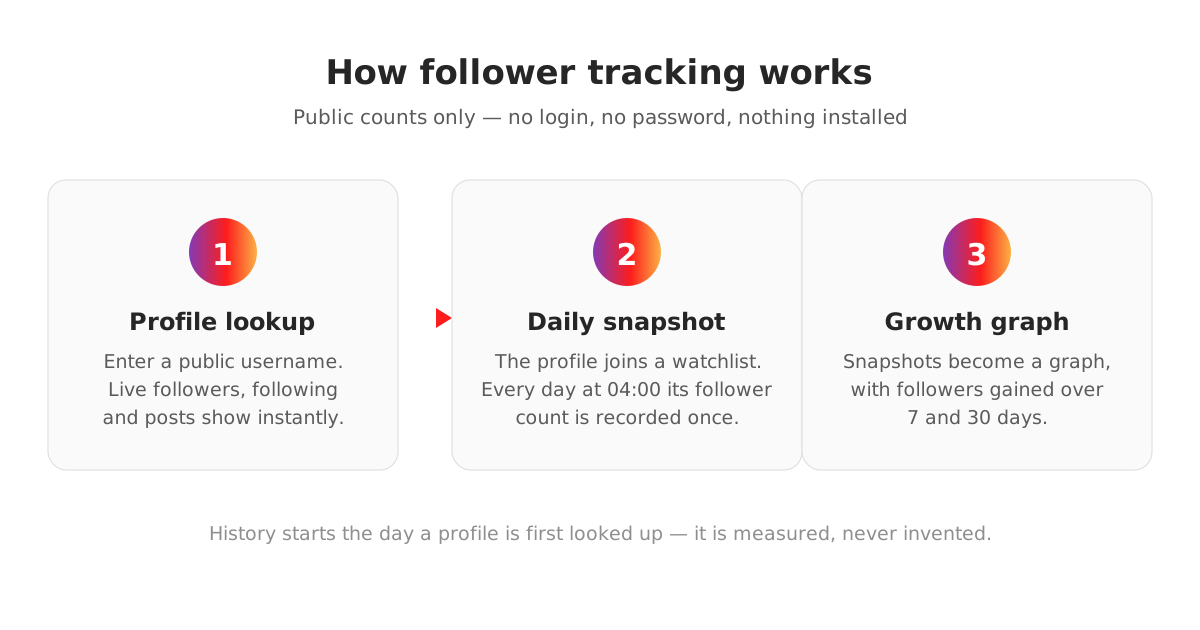
The tracker used in this guide is built into the Instagram viewer on this site. It has three moving parts, and none of them involves your password.
First, the lookup. You enter a public username in the viewer. The profile card shows the live follower, following and post counts for that account — the same public numbers anyone can see on Instagram itself, pulled in at the moment you ask.
Second, the daily snapshot. Looking a profile up adds it to a watchlist. Once a day, at 04:00, an automated snapshot records that account's current follower count. One point per day, every day, stored as a simple dated series. No snapshot, no history — growth can only ever be reported for the period a profile has actually been tracked, which is exactly how honest measurement should work.
Third, the growth panel. Each profile card carries a follower growth graph drawn from those snapshots, with gained-followers figures for the last 7 and last 30 days once enough history exists to calculate them truthfully.
Now the part most sites would hide: tracking on ClipDowns only started on 9 October 2026. As this article is published, 30 public profiles are being tracked and the longest history any of them has is a few days. A 7-day figure needs roughly six days of snapshots behind it; a 30-day figure needs about twenty-five. Until a profile crosses those lines, the viewer says so in plain words — tracking started, history is building — instead of dressing up three days of data as a monthly trend. The figures will fill in day by day, and this article will not pretend they already have.
How to Track a Profile's Follower Growth, Step by Step
The whole process takes under a minute, and most of it happens without you doing anything at all.
- 1
Open the Instagram viewer
Go to the Instagram viewer on ClipDowns and make sure the Profile tab is selected. No account, no sign-up, no app to install.
- 2
Enter the username
Type any public username — your own, a competitor's, a creator you study — and run the lookup. Private accounts cannot be tracked, here or anywhere else.
- 3
Read the live counts
The profile card shows the account's current followers, following and posts. This first lookup also starts the clock: the profile joins the daily snapshot watchlist automatically.
- 4
Come back and read the growth
Revisit the profile over the following days. The growth panel graphs each daily snapshot and, once about a week of history exists, reports followers gained over 7 days — and over 30 days after roughly a month.
Reading the Numbers: What Follower Growth Actually Tells You
A follower count on its own is a vanity metric. A follower count over time is a diagnostic tool. The shape of the line tells you things a single number never can.
Steady climbs mean the content engine is working — the account is converting viewers into followers at a consistent rate, which is the pattern that compounds. Sudden spikes almost always trace back to a single event: a Reel that escaped the account's usual audience, a mention, a collaboration, a news moment. Find the spike's date and you have found the content worth making more of. Sharp drops are equally informative — a controversial post, a bought-follower purge by Instagram, or a long silence will all show up as the line stepping down. Flat lines on a posting account are the quiet warning: reach without conversion, views that never turn into follows.
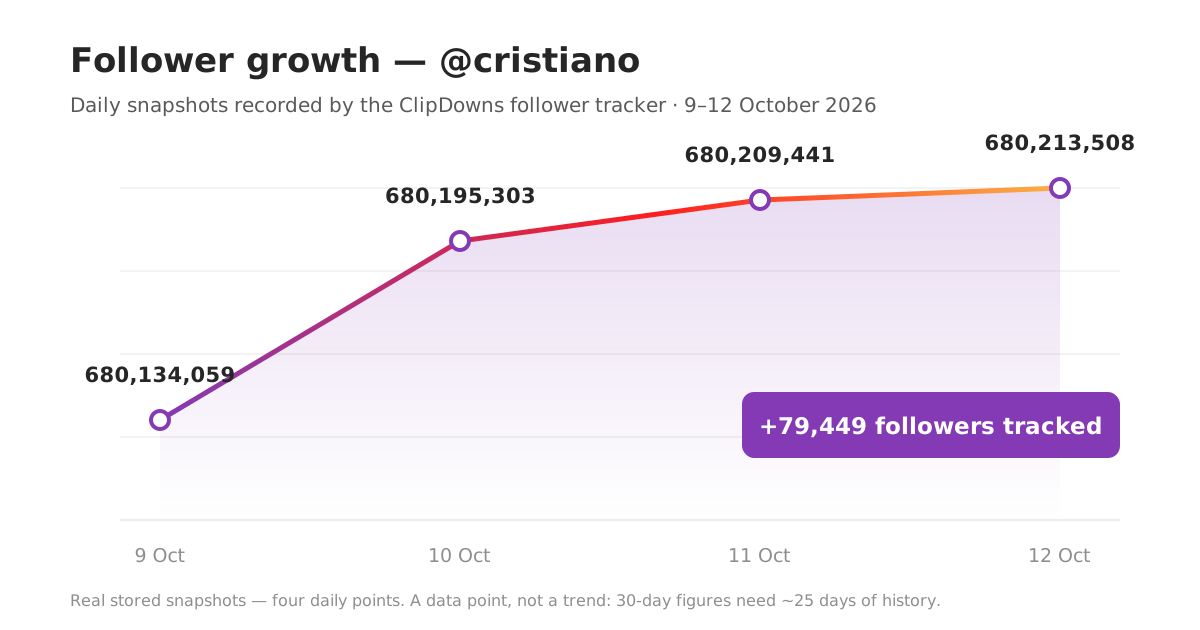
Here is what the earliest real data from this tracker looks like. Cristiano Ronaldo's public account was snapshotted on the first day of tracking, 9 October 2026, at 680,134,059 followers. Three daily snapshots later, on 12 October, it stood at 680,213,508 — a gain of 79,449 followers across the tracked days. That is a genuine measured figure from stored snapshots, not an estimate. It is also, deliberately, all we will claim from it: three days is a data point, not a trend, and anyone who turns three days of your growth into a confident monthly forecast is selling you something.
For your own account, the practical routine is simple. Note the count before a campaign, a collaboration or a posting experiment, then watch the daily line for two weeks. Growth that moves when you act — and only when you act — tells you exactly which actions are worth repeating.
"Recently Followed" and Recent Followers: The Honest Answer
A large share of follower-tracker searches are really one question in disguise: how can I see who someone recently followed, or who recently followed them? It deserves a straight answer instead of another fake loading bar.
For someone else's account, you cannot. Instagram does not expose follow timestamps or ordered follower lists for other profiles to anyone outside the account — not to websites, not to apps, not to this one. The chronological follower list you may remember from years ago was removed by Instagram itself, and the order accounts appear in a follower list today is not a reliable timeline. Every "recently followed checker" that claims otherwise is performing theatre: the progress bar, the "connecting to server" messages and the blurred results are designed to carry you to a paywall, a survey or a login form.
For your own account, you do not need a tracker at all. Instagram shows account owners their own recent activity inside the app: new followers appear in your notifications and follower list, and your own following list can be sorted by date followed, earliest or latest. That is the one place this data legitimately exists, because it is yours.
What you can legitimately watch on other accounts is movement. A rival creator gaining 4,000 followers the week they launched a series, or a competitor quietly bleeding followers for a month — that is public, measurable and, for content strategy, usually more useful than a list of usernames would have been. Counts over time are the honest version of the question, and they are what this tracker is built to answer.
Why Tracker Apps That Ask for Your Password Are a Bad Trade
The other big family of follower trackers works differently: apps that ask you to log in with your Instagram username and password, then promise unfollower lists and follower analytics in return. Understand what you are actually handing over and what it buys you.
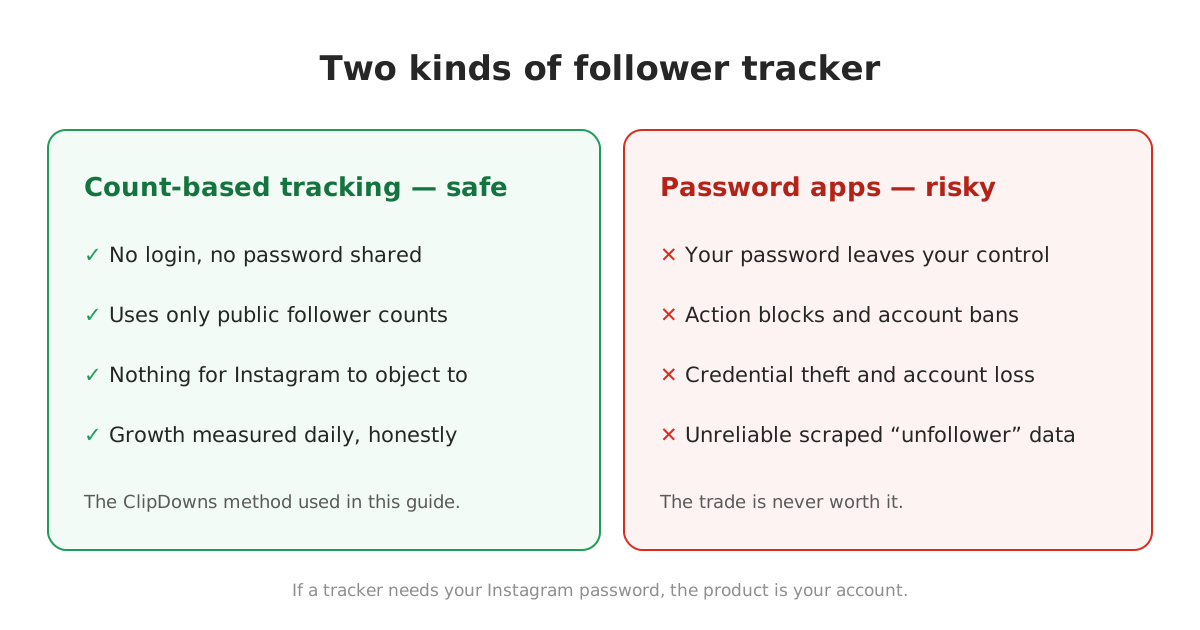
Your credentials leave your control. The moment a third-party app holds your password, your account's safety depends on that developer's security and intentions. Leaks, resale and outright account theft all start exactly here, and Instagram support will not be sympathetic when the login came from you.
Instagram actively fights these apps. Unofficial-API logins are the pattern Instagram's systems are built to detect. Accounts that use them get hit with action blocks, forced password resets, checkpoint challenges and, for repeat use, permanent bans. People regularly lose years-old accounts this way and only then learn the analytics were not worth it.
The data itself is mediocre. Unfollower detection by list-scraping breaks whenever Instagram changes anything, misses people who deactivate or get suspended, and presents guesses as facts. You are risking the account to receive unreliable numbers about it.
Count-based tracking inverts the trade completely. Nothing to log into, nothing to steal, nothing for Instagram to object to — the data comes from public numbers recorded over time. You give up the theatrical extras (which were largely fake anyway) and keep the measurements that were real.
The Limits of Follower Tracking, Stated Plainly
- Public accounts only. A private profile's follower count is not public data, so it cannot be snapshotted. No tracker can change this; ones that claim to are lying.
- Daily granularity. Snapshots are taken once a day. You will see growth by the day, not by the hour — which matches how growth decisions are actually made.
- History starts when tracking starts. Nobody can retroactively produce last month's daily counts for an account they were not watching. Any tool showing you instant 90-day history for a profile you just searched was not measuring it — it was inventing it.
- Counts are totals, not names. The graph tells you how many followers an account gained or lost, never who they were. That is a platform limit, and it is also a reasonable privacy line.
Track the line, learn from its shape, and ignore any tool that promises you more than public data can deliver. If you want to see the tracker itself, it is live on the Instagram profile viewer — enter a public username and the first snapshot is taken the moment you look.
Follower Tracking FAQs
What is an Instagram follower tracker?
A tool that records a public account's follower count at regular intervals — here, once a day — and shows how the total changes over time as a graph and gained-followers figures. It measures counts, not follower names, because counts are the part Instagram makes public.
How can I track someone's Instagram follower growth?
Open the Instagram viewer on ClipDowns, enter the public username, and the profile is added to a daily snapshot watchlist automatically. Return over the following days to see the growth graph; 7-day gained figures appear after about six days of history and 30-day figures after about twenty-five.
Can I see who someone recently followed on Instagram?
No. Follow timestamps and ordered following lists for other accounts are not public data, and Instagram does not expose them to any website or app. Sites claiming to show another account's recent follows are faking it. You can only see date-followed ordering for your own account, inside your own app.
Can I see who recently followed an Instagram account?
For your own account, yes — inside Instagram itself, via your notifications and follower list. For someone else's account, no tool can list their recent followers. What you can measure on other accounts is the follower count itself and how it moves day by day.
Is it safe to use follower tracker apps that ask for my password?
No. Sharing your Instagram password with a third-party app risks credential theft and triggers Instagram's defences against unofficial logins — action blocks, forced resets and permanent bans are common outcomes. Count-based tracking needs no login at all and carries none of that risk.
Why does the tracker say 'tracking started' instead of showing growth?
Because the history is genuinely new. ClipDowns began daily follower snapshots on 9 October 2026, so a profile needs about a week of snapshots before a 7-day figure is honest and about a month before a 30-day figure is. The panel shows the real status rather than inventing numbers to fill the gap.
Can I track a private Instagram account's followers?
No. A private account's follower count is not public, so there is nothing to snapshot. This applies to every tracker, not just this one — treat any tool claiming private-account tracking as a scam.
Is this follower tracker free?
Yes. Looking up profiles and tracking their follower growth on ClipDowns is free, with no account to create and no Instagram login required.